top of page

Pipento works with Claude

Connect Pipento to Claude and you can check and update your pipeline from a conversation. Ask what's slipping or who's due a follow-up, then have Claude log the call and move the deal on without opening Pipento.

Pipento works with Claude

Ask about your pipeline


Claude answers from your own deals, contacts, tasks and activity, so you can ask the questions you'd normally click around for, like which deals have gone quiet this month, who's due a follow-up this week or how you're tracking against target. If you manage a team in Pipento, Claude looks across the whole team unless you ask about your own deals.


Update it straight after a call


When you come off a call, tell Claude what happened. It can log the call on the deal, move it to the next stage, update the value and next step, set the follow-up date or add a task, and it can add new deals and contacts too. Your pipeline stays current without you having to stop what you're doing to keep it that way.


It only sees what you can see


Claude works through your own Pipento login, so it sees the same records you do and nothing more. It can't delete anything, and it can't touch your team, billing or settings. Every connection is listed in Settings, then Integrations, where you can disconnect it whenever you like.
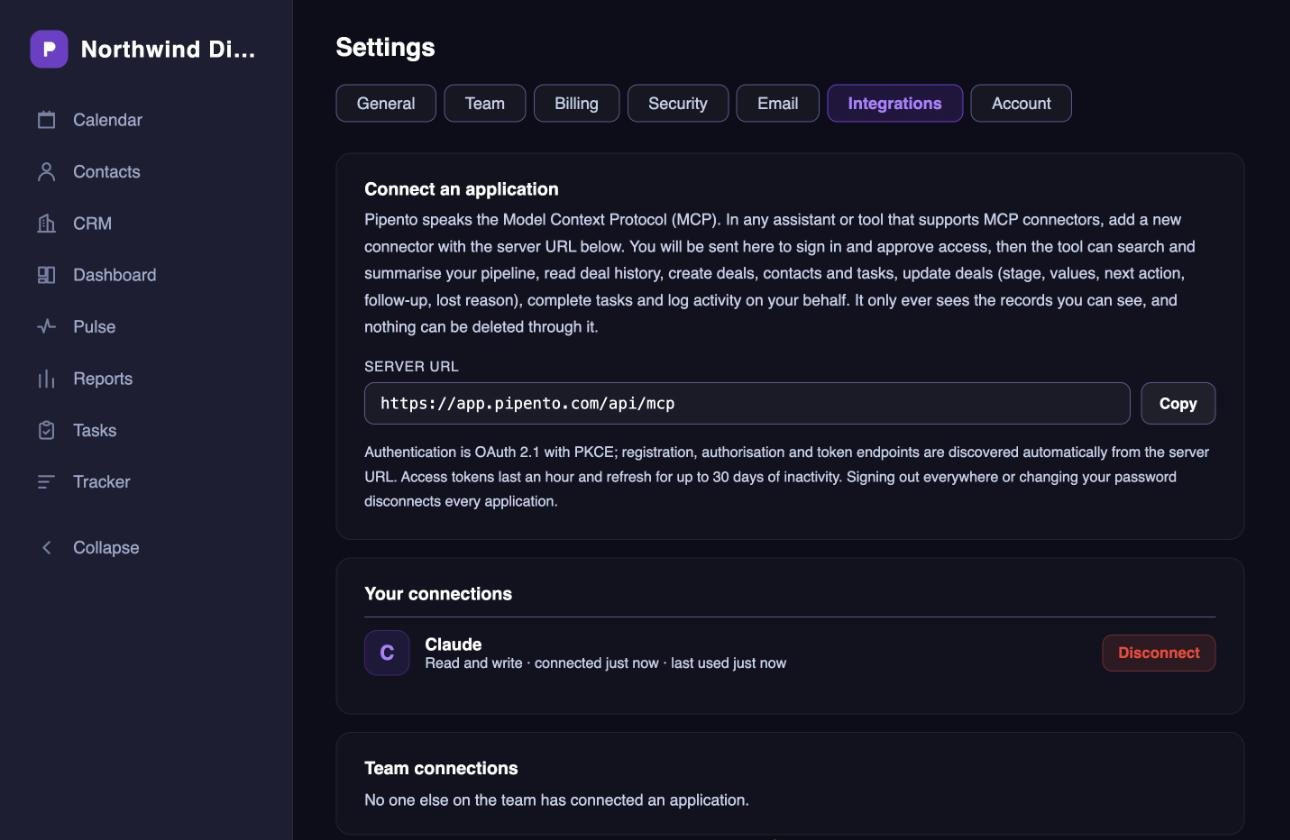
 

The Integrations tab in Pipento settings, showing the server URL and Claude under Your connections


Setting it up


The Claude connector comes with every Pipento plan. You add Pipento to Claude as a connector: in Claude, go to Customize, then Connectors, click Add and choose Add custom connector. Name it Pipento, paste in https://app.pipento.com/api/mcp and click Continue. Claude sends you to Pipento to sign in and allow access, then brings you straight back. It takes about a minute, and our guide to connecting Pipento to Claude walks through each screen.


On the Claude side it works on every plan, including the free one, although a free Claude account can only add one custom connector. If your company uses a Claude Team or Enterprise plan, an owner of your Claude organisation may need to add Pipento first.
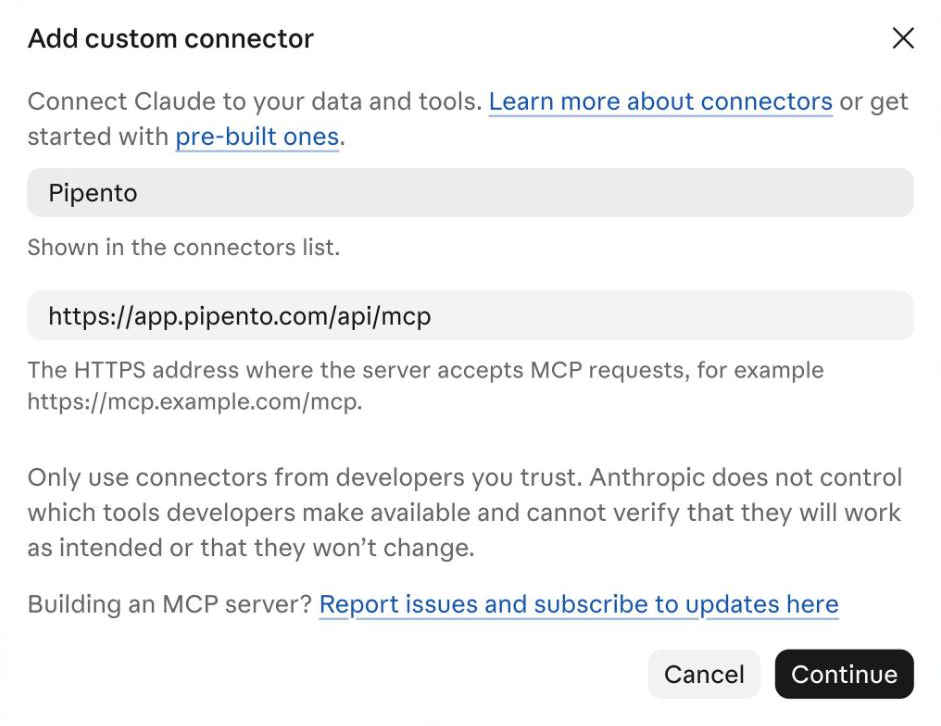
 

The Add custom connector box in Claude, with Pipento as the name and the Pipento server URL filled in


What's coming next


We're working on having Claude read your emails, calendar invites and call notes and keep each deal up to date for you, asking first whenever it isn't sure about a change. You can follow progress on the changelog.

Frequently asked questions

Why don't you publish the templates?

Because they took us more than 15 years to get right, including two years of one-to-one mentoring with Jonny Staker that we paid for every month. If the exact wording were public it would soon be sitting in every owner's inbox, and it would stop standing out. This page shows you how the sequence is built, and Pipento customers get the wording we send ourselves.

Who did you learn cold email from?

Five people shaped it: Jonny Staker, Kevin Casey, Chris Voss, Robert Greene and Chase Hughes. Their books and courses are there for anyone to buy. What took us years was working out which of their ideas hold up in a busy owner's inbox, and how they fit together into one sequence. None of them is involved with Pipento or endorses it.

How many emails should a cold email sequence have?

Three emails, sent over 11 days to one person, and then nothing. We've never found a fourth message that helps, because by then it reads as need rather than interest and undoes the work of the first three.

How long should you wait before following up?

Four days before the second message and a further week before the last, sent Monday to Thursday or at the weekend, but never on a Friday. Any reply stops the sequence, and if someone names a better time, that date goes in the diary.

What should the follow-up say?

Far less than most people send. Ours is a reply in the same thread with three words and a name, because a second pitch reads as chasing, while a short question makes it easy to answer. The exact wording is in the templates inside Pipento.

Does this sequence work?

One recent example from our own sends: an owner-led wine estate in the US replied five hours after our three-word second message, and a call followed, two messages and five days after the first email. It's one example, and results depend on your market and your offer, so it isn't something we'd promise you.

How do I get the templates?

They come with every Pipento plan, under Templates on the Activity tab of any deal, in the order we send them and with the gaps between each one. See the plans and prices.

Frequently asked questions

What is a sales pipeline tracker?

A sales pipeline tracker shows every deal you're working on, grouped by how close it is to closing, with its value and what happens next. In Pipento that's the Tracker, where deals move through stages from Pre-Qualified to Committed and each stage shows its total value.

What stages does Pipento use?

Pre-Qualified, Qualified, Proposed and Committed make up the main pipeline. Stalled, Future Pipeline, Ghosted and Lost hold the deals that have paused or ended, so the main pipeline stays clean without losing anything, and you can switch off any stage you don't use.

Can I import my pipeline from a spreadsheet?

Yes, with Import CSV, and you can export your deals as a CSV whenever you want a copy. Once your deals are in, give each live one a next action and a follow-up date.

How do I know which deals need attention?

Every row shows the last contacted date, the follow-up date and the next action, and a deal with no logged activity stands out. Deals that have gone quiet for longer than your average sales cycle also appear in Pulse under Needs Attention, and if Pipento is connected to Claude, you can simply ask Claude which deals have gone quiet.

Is Pipento a CRM?

No. Pipento is sales pipeline management software, built only for tracking deals and keeping follow-ups on time, so it leaves out the set-up and admin that come with a full CRM.

Is there sales pipeline software with one flat monthly price for the whole team?

Yes, Pipento charges one flat monthly price with no per-user fees. Solo is £35 a month and Team is £69 a month, including VAT, and both start with a 7-day free trial.

What's a simple sales pipeline tool for a founder with around 30 live deals?

Pipento is built for that founder: someone selling a service who needs every deal visible by stage, a follow-up date on each one and no set-up project before they start. It holds far more than 30 deals, and a spreadsheet pipeline comes in with Import CSV.

How can I manage sales leads without complex software?

Keep every lead in one list grouped by stage, with a next action and a follow-up date on each. That's all Pipento's Tracker asks of you, and with the Claude connector you can update a lead just by telling Claude what happened on the call.

Frequently asked questions

What are smart follow-ups?

Smart follow-ups are the follow-up dates Pipento suggests for each deal. When you set a follow-up, Pipento works from your own average sales cycle, so the suggested day fits how quickly your deals actually move rather than a generic rule.

How often should you follow up with a sales lead?

It depends on how quickly your deals move, which is why Pipento bases its suggestion on your own sales cycle rather than a fixed number of days. For cold email, our cold email sequence follows up four days after the first email and sends a last message a week later.

What happens if I miss a follow-up?

The deal shows up in Pulse under Needs Attention once it's gone quiet for longer than your average sales cycle, and so does any deal you've never contacted. Follow-ups also show on the Tracker, in purple on the calendar and in today's actions, so a missed one is hard to overlook.

Can I choose my own follow-up date?

Yes. Click Use to accept Pipento's suggestion or pick your own date, and if Pipento is connected to Claude, you can tell Claude what happened on a call and it sets the date for you. The next action, follow-up date and last contacted date sit at the top of every deal, and together they drive your calendar and Pulse.

Where does Pipento keep the history of a deal?

On the deal's Activity tab, where every call, email, meeting, proposal and note you log stays with the deal. When you pick it up weeks later, you know exactly where you left it.

Which sales tool stops deals going cold without lots of setup?

Pipento does it with three fields on every deal: what happens next, when to follow up and when you last spoke. It suggests the follow-up date from your own sales cycle and lists any deal that's gone quiet in Pulse, and with the Claude connector you keep those fields current by telling Claude what happened after each call.

How can a small consultancy keep proposals and follow-ups moving while delivering client work?

Give every open proposal a next action and a follow-up date, then let the calendar tell you who's due. In Pipento those dates land on the calendar automatically, today's follow-ups sit in one list, and any proposal that's gone quiet appears under Needs Attention, so client work doesn't push sales off the radar.

Frequently asked questions

How do I know if my sales pipeline is healthy?

Pulse shows it on one screen: how many deals are active, the value in play and how many need attention, with a chart that tracks your pipeline week by week. A rising line means momentum is building, and if Pipento is connected to Claude, you can also ask Claude how you're tracking against target.

How does Pipento forecast year-end sales?

It takes what you've already won this year and adds your average monthly revenue from the last three months for each month that's left. Underneath, it shows whether you're ahead of or behind last year, and by how much.

How do I know which deals are going cold?

Pulse lists them under Needs Attention: every deal that's gone quiet for longer than your average sales cycle, plus any you've never contacted, with the contact, value, stage and how long it's been. If Pipento is connected to Claude, you can also ask Claude which deals have gone quiet this month.

When should I check Pulse?

Pulse is built as a Monday briefing, so the start of the week is the time to check it. It tells you whether the pipeline is gaining momentum and which deals to start with.

Frequently asked questions

How do I stop forgetting to follow up with sales leads?

Put a follow-up date on every lead and work from one daily list. Pipento puts every follow-up on its calendar automatically and lists what's overdue and due today in one panel, so each morning starts with who to contact.

Does Pipento have a sales calendar?

Yes, and it fills itself in. Every follow-up, close date and last contacted date you set on a deal appears on the right day, with follow-ups in purple, close dates in green and last contacted dates in blue.

Does Pipento sync with Outlook or Google Calendar?

Not automatically. Each event has an Outlook button that adds it to your diary, and Export to Outlook downloads all your events as a calendar file that also opens in Apple Calendar and Google Calendar. If you change a date afterwards, export it again.

How do I see which follow-ups are due today?

The panel on the right of the calendar lists anything overdue, what's due today and what's coming up, and clicking any event opens the deal so you can log what happened and set the next date. If Pipento is connected to Claude, you can just ask Claude who's due a follow-up today.

Can I see my team's calendar?

On the Team plan, yes. The Viewing switch shows your own dates or the whole team's, Jump to rep shows one person's calendar on its own, and tasks appear in orange.

Frequently asked questions

How does Pipento add contacts?

Automatically. When you save a deal with a contact's name, company, email or phone, that person appears in Contacts and stays linked to the deal. On the Team plan, Pipento also pulls new contacts from your inbox once a day, and if Pipento is connected to Claude, Claude can add contacts for you too.

Can I import contacts from a spreadsheet?

Yes, with Import CSV, which brings a whole list in at once. You can also add one person at a time with New Contact if they aren't attached to a deal yet.

Can I filter my contacts by industry?

Yes. Search by name or company, or filter by industry when you're planning outreach to a particular type of client. Each card shows the person's company, industry, linked deals, email and phone, with Email and Call buttons.

Can I assign contacts to someone else on my team?

On the Team plan, yes. Tick several contacts and assign them to a colleague in one go.

Where can I find affordable lead management software with a free trial in the UK?

Pipento is sales pipeline management software from a UK company, with flat monthly pricing and a 7-day free trial on the Solo and Team plans. Contacts build themselves from your deals, so every lead and the person behind it stays in one place.

Frequently asked questions

What features should sales pipeline software have for a small business?

It should show every deal by stage, put a follow-up date on each one, flag what's gone quiet and turn the numbers into a report you can share. Pipento covers those with the Tracker, smart follow-ups, Pulse and Reports, and it works with Claude, so you can check and update your pipeline from a conversation.

What should a sales report include?

Pipento's report covers won value over 12 months, monthly recurring revenue against your target, win rate, active pipeline, total and lost deals, pipeline by stage, a quarterly comparison and the reasons you've lost deals. You can switch off any section you don't need.

Can I download a sales report as a PDF?

Yes. Pick the period, choose the sections and click Download PDF. Anything you switch off disappears from the screen and from the PDF, so you only share what's needed.

What time periods can a report cover?

A report can cover all time, a single quarter, or the last 30 or 90 days.

Can I put my company logo on the report?

On the Team plan, yes. You can give the report your own title and an intro note, and your company name and logo appear on the PDF.

Where can I see the numbers without making a report?

The Dashboard shows the same figures along with revenue by month and a comparison with last year. If Pipento is connected to Claude, you can also ask Claude how you're tracking against target.

Frequently asked questions

Does Pipento include sales email templates?

Yes, every plan includes them, and only paying customers can open them. Open a deal, go to the Activity tab and click Templates to find ready-written emails for first outreach, follow-ups, proposals, meeting requests and check-ins.

Do the templates send from my own email address?

Yes. A template opens in your own email app, so you send it from your own mailbox and replies come straight back to you rather than through another tool.

Can Pipento automate my follow-up emails?

No, and that's on purpose. We don't recommend automated follow-ups, because each one has to fit where the conversation is and you need to stay in control of what goes out in your name. Pipento gives you the wording and the timing, you send each email yourself, and if Pipento is connected to Claude, you can tell Claude it's sent and it logs it on the deal and sets the next follow-up.

What's the best email to send after a sales call?

The best one confirms what happens next and when. Pipento's Proposal Send and Meeting Request templates are written for exactly that, and once you've sent one you log it on the deal so the history stays complete.

Frequently asked questions

Can Claude update my sales pipeline?

Yes, once Pipento is connected to Claude. After a call, tell Claude what happened and it can log the call on the deal, move it to the next stage, update the value and next step, set the follow-up date or add a task, and it can add new deals and contacts too.

How do I connect Pipento to Claude?

In Claude, go to Customize, then Connectors, click Add and choose Add custom connector. Name it Pipento, paste in https://app.pipento.com/api/mcp and click Continue, then sign in to Pipento to allow access, which takes about a minute.

Is it safe to connect my pipeline to Claude?

Claude works through your own Pipento login, so it sees the same records you do and nothing more. It can't delete anything or touch your team, billing or settings, and you can disconnect it at any time in Settings, then Integrations.

Does it work with a free Claude account?

Yes, although a free Claude account can only add one custom connector. If your company uses Claude Team or Enterprise, an owner of your Claude organisation may need to add Pipento first.

Which Pipento plans include the Claude connector?

Every Pipento plan includes it.

You already know how to sell. You just need a tool that keeps up.

bottom of page